Azure IoT Client MQTT State Machine

Jessica Wood
Published Feb 16, 2026
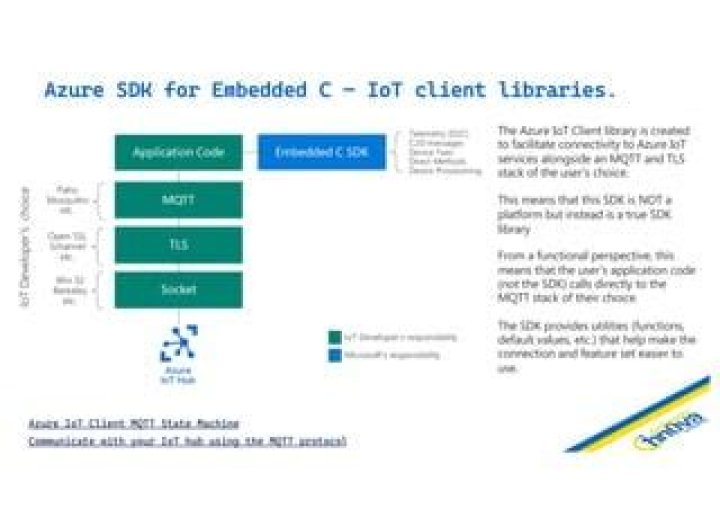
Device Provisioning and IoT Hub service protocols require additional state management on top of the MQTT protocol. The Azure IoT Hub and Provisioning clients for C provide a common programming model. The clients must be layered on top of an MQTT client selected by the application developer.
The following aspects are being handled by the IoT Clients:
- Generate MQTT CONNECT credentials.
- Obtain SUBSCRIBE topic filters and PUBLISH topic strings required by various service features.
- Parse service errors and output an uniform error object model.
- Provide the correct sequence of events required to perform an operation.
- Provide suggested timing information when retrying operations.
The following aspects need to be handled by the application or convenience layers:
- Ensure secure TLS communication using either server or mutual X509 authentication.
- Perform MQTT transport-level operations.
- Delay execution for retry purposes.
- (Optional) Provide real-time clock information and perform HMAC-SHA256 operations for SAS token generation.
For more information about Azure IoT services using MQTT see this article.
IoT Hub
Device Provisioning Service
In order to port the clients to a target platform the following items are required:
- Support for a C99 compiler.
- Types such as
uint8_tmust be defined. - The target platform supports a stack of several kB (actual requirement depends on features being used and data sizes).
- An MQTT over TLS client supporting QoS 0 and 1 messages.
Optionally, the IoT services support MQTT tunneling over WebSocket Secure which allows bypassing firewalls where port 8883 is not open. Using WebSockets also allows usage of devices that must go through a WebProxy. Application developers are responsible with setting up the wss:// tunnel.
Connecting
The application code is required to initialize the TLS and MQTT stacks. Two authentication schemes are currently supported: X509 Client Certificate Authentication and Shared Access Signature authentication.
When X509 client authentication is used, the MQTT password field should be an empty string.
If SAS tokens are used the following APIs provide a way to create as well as refresh the lifetime of the used token upon reconnect.
Example:
Recommended defaults:
- MQTT Keep-Alive Interval:
AZ_IOT_DEFAULT_MQTT_CONNECT_KEEPALIVE_SECONDS - MQTT Clean Session: false.
MQTT Clean Session
We recommend to always use Clean Session false when connecting to IoT Hub. Connecting with Clean Session true will remove all enqueued C2D messages.
Subscribe to Topics
Each service requiring a subscription implements a function similar to the following:
Example:
Note: If the MQTT stack allows, it is recommended to subscribe prior to connecting.
Sending APIs
Each action (e.g. send telemetry, request twin) is represented by a separate public API. The application is responsible for filling in the MQTT payload with the format expected by the service.
Example:
Note: To limit overheads, when publishing, it is recommended to serialize as many MQTT messages within the same TLS record. This feature may not be available on all MQTT/TLS/Sockets stacks.
Receiving APIs
We recommend that the handling of incoming MQTT PUB messages is implemented by a chain-of-responsibility architecture. Each handler is passed the topic and will either accept and return a response, or pass it to the next handler.
Example:
{
}
{
}
{
{
case AZ_IOT_CLIENT_TWIN_RESPONSE_TYPE_GET:
break;
case AZ_IOT_CLIENT_TWIN_RESPONSE_TYPE_DESIRED_PROPERTIES:
break;
case AZ_IOT_CLIENT_TWIN_RESPONSE_TYPE_REPORTED_PROPERTIES:
break;
default:
}
}
Important: C2D messages are not enqueued until the device establishes the first MQTT session (connects for the first time to IoT Hub). The C2D message queue is preserved (according to the per-message time-to-live) as long as the device connects with Clean Session false.
Retrying Operations
Retrying operations requires understanding two aspects: error evaluation (did the operation fail, should the operation be retried) and retry timing (how long to delay before retrying the operation). The IoT client library is supplying optional APIs for error classification and retry timing.
Error Policy
The SDK will not handle protocol-level (WebSocket, MQTT, TLS or TCP) errors. The application-developer is expected to classify and handle errors the following way:
- Operations failing due to authentication errors should not be retried.
- Operations failing due to communication-related errors other than ones security-related (e.g. TLS Alert) may be retried.
Both IoT Hub and Provisioning services will use MQTT CONNACK as described in Section 3.2.2.3 of the MQTT v3 specification.
IoT Service Errors
APIs using az_iot_status report service-side errors to the client through the IoT protocols.
The following APIs may be used to determine if the status indicates an error and if the operation should be retried:
{
}
else
{
{
}
else
{
}
}
Retry Timing
Network timeouts and the MQTT keep-alive interval should be configured considering tradeoffs between how fast network issues are detected vs traffic overheads. This document describes the recommended keep-alive timeouts as well as the minimum idle timeout supported by Azure IoT services.
For connectivity issues at all layers (TCP, TLS, MQTT) as well as cases where there is no retry-after sent by the service, we suggest using an exponential back-off with random jitter function. az_iot_retry_calc_delay is available in Azure IoT Common:
Note 1: The network stack may have used more time than the recommended delay before timing out. (e.g. The operation timed out after 2 minutes while the delay between operations is 1 second). In this case there is no need to delay the next operation.
Note 2: To determine the parameters of the exponential with back-off retry strategy, we recommend modeling the network characteristics (including failure-modes). Compare the results with defined SLAs for device connectivity (e.g. 1M devices must be connected in under 30 minutes) and with the available IoT Azure scale (especially consider throttling, quotas and maximum requests/connects per second).
In the absence of modeling, we recommend the following default:
min_retry_delay_msec = 1000;
max_retry_delay_msec = 100000;
max_random_msec = 5000;
For service-level errors, the Provisioning Service is providing a retry-after (in seconds) parameter:
int32_t delay_ms;
if ( response.retry_after_seconds > 0 )
{
delay_ms = response.retry_after_seconds;
}
else
{
}
Suggested Retry Strategy
Combining the functions above we recommend the following flow:
When devices are using IoT Hub without Provisioning Service, we recommend attempting to rotate the IoT Credentials (SAS Token or X509 Certificate) on authentication issues.
Note: Authentication issues observed in the following cases do not require credentials to be rotated:
- DNS issues (such as WiFi Captive Portal redirects)
- WebSockets Proxy server authentication