@azure/web-pubsub

Rachel Davis
Published Feb 16, 2026
Azure Web PubSub service is an Azure-managed service that helps developers easily build web applications with real-time features and publish-subscribe pattern. Any scenario that requires real-time publish-subscribe messaging between server and clients or among clients can use Azure Web PubSub service. Traditional real-time features that often require polling from server or submitting HTTP requests can also use Azure Web PubSub service.
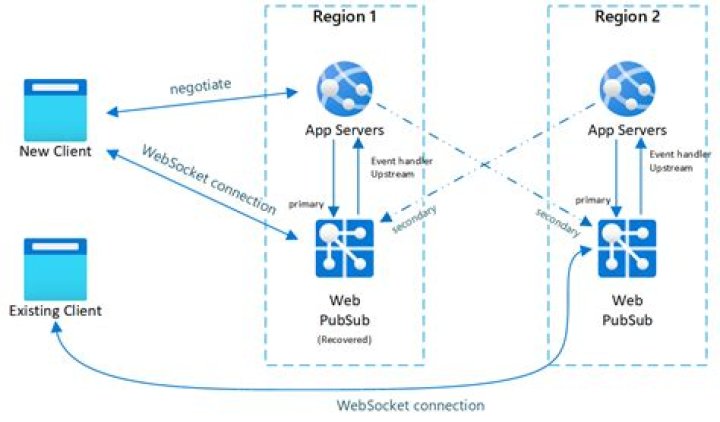
You can use this library in your app server side to manage the WebSocket client connections, as shown in below diagram:
.
- Send messages to hubs and groups.
- Send messages to particular users and connections.
- Organize users and connections into groups.
- Close connections
- Grant, revoke, and check permissions for an existing connection
Details about the terms used here are described in Key concepts section.
Source code |Package (NPM) |API reference documentation |Product documentation |Samples
Getting started
Currently supported environments
Prerequisites
1. Install the @azure/web-pubsub package
npm install @azure/web-pubsub2. Create and authenticate a WebPubSubServiceClient
const { WebPubSubServiceClient } = require("@azure/web-pubsub");const serviceClient = new WebPubSubServiceClient("<ConnectionString>", "<hubName>");You can also authenticate the WebPubSubServiceClient using an endpoint and an AzureKeyCredential:
const { WebPubSubServiceClient, AzureKeyCredential } = require("@azure/web-pubsub");const key = new AzureKeyCredential("<Key>");const serviceClient = new WebPubSubServiceClient("<Endpoint>", key, "<hubName>");Or authenticate the WebPubSubServiceClient using Azure Active Directory
- Install the
@azure/identitydependency
npm install @azure/identity- Update the source code to use
DefaultAzureCredential:
const { WebPubSubServiceClient, AzureKeyCredential } = require("@azure/web-pubsub");const key = new DefaultAzureCredential();const serviceClient = new WebPubSubServiceClient("<Endpoint>", key, "<hubName>");Key concepts
Connection
A connection, also known as a client or a client connection, represents an individual WebSocket connection connected to the Web PubSub service. When successfully connected, a unique connection ID is assigned to this connection by the Web PubSub service.
Hub
A hub is a logical concept for a set of client connections. Usually you use one hub for one purpose, for example, a chat hub, or a notification hub. When a client connection is created, it connects to a hub, and during its lifetime, it belongs to that hub. Different applications can share one Azure Web PubSub service by using different hub names.
Group
A group is a subset of connections to the hub. You can add a client connection to a group, or remove the client connection from the group, anytime you want. For example, when a client joins a chat room, or when a client leaves the chat room, this chat room can be considered to be a group. A client can join multiple groups, and a group can contain multiple clients.
User
Connections to Web PubSub can belong to one user. A user might have multiple connections, for example when a single user is connected across multiple devices or multiple browser tabs.
Message
When the client is connected, it can send messages to the upstream application, or receive messages from the upstream application, through the WebSocket connection.
Examples
Get the access token for a client to start the WebSocket connection
const { WebPubSubServiceClient } = require("@azure/web-pubsub");const serviceClient = new WebPubSubServiceClient("<ConnectionString>", "<hubName>");let token = await serviceClient.getClientAccessToken();
token = await serviceClient.getClientAccessToken({ userId: "user1" });
Broadcast messages to all connections in a hub
const { WebPubSubServiceClient } = require("@azure/web-pubsub");const serviceClient = new WebPubSubServiceClient("<ConnectionString>", "<hubName>");await serviceClient.sendToAll({ message: "Hello world!" });await serviceClient.sendToAll("Hi there!", { contentType: "text/plain" });const payload = new Uint8Array(10);await serviceClient.sendToAll(payload.buffer);Send messages to all connections in a group
const { WebPubSubServiceClient } = require("@azure/web-pubsub");const serviceClient = new WebPubSubServiceClient("<ConnectionString>", "<hubName>");const groupClient = serviceClient.group("<groupName>");await groupClient.addUser("user1");await groupClient.sendToAll({ message: "Hello world!" });await groupClient.sendToAll("Hi there!", { contentType: "text/plain" });const payload = new Uint8Array(10);await groupClient.sendToAll(payload.buffer);Send messages to all connections for a user
const { WebPubSubServiceClient } = require("@azure/web-pubsub");const serviceClient = new WebPubSubServiceClient("<ConnectionString>", "<hubName>");await serviceClient.sendToUser("user1", { message: "Hello world!" });await serviceClient.sendToUser("user1", "Hi there!", { contentType: "text/plain" });const payload = new Uint8Array(10);await serviceClient.sendToUser("user1", payload.buffer);Check if the group has any connection
const { WebPubSubServiceClient } = require("@azure/web-pubsub");const WebSocket = require("ws");const serviceClient = new WebPubSubServiceClient("<ConnectionString>", "<hubName>");const groupClient = serviceClient.group("<groupName>");await groupClient.closeAllConnections({ reason: "<closeReason>" });const hasConnections = await serviceClient.groupExists("<groupName>");Access the raw HTTP response for an operation
const { WebPubSubServiceClient } = require("@azure/web-pubsub");function onResponse(rawResponse: FullOperationResponse): void{ console.log(rawResponse);
}const serviceClient = new WebPubSubServiceClient("<ConnectionString>", "<hubName>");await serviceClient.sendToAll({ message: "Hello world!" }, { onResponse });
Troubleshooting
Enable logs
You can set the following environment variable to get the debug logs when using this library.
- Getting debug logs from the SignalR client library
export AZURE_LOG_LEVEL=verboseFor more detailed instructions on how to enable logs, you can look at the @azure/logger package docs.
Live Trace
Use Live Trace from the Web PubSub service portal to view the live traffic.
Next steps
Please take a look at thesamplesdirectory for detailed examples on how to use this library.
Contributing
If you'd like to contribute to this library, please read the contributing guide to learn more about how to build and test the code.